
How to Use the Dog Selector — Filter Your Way to Better Greyhound Bets
The Dog Selector is the most powerful page on ratethat.dog — every UK runner, dozens of filters, instant P&L on saved systems. Here's the practical walkthrough.
What is the Dog Selector?
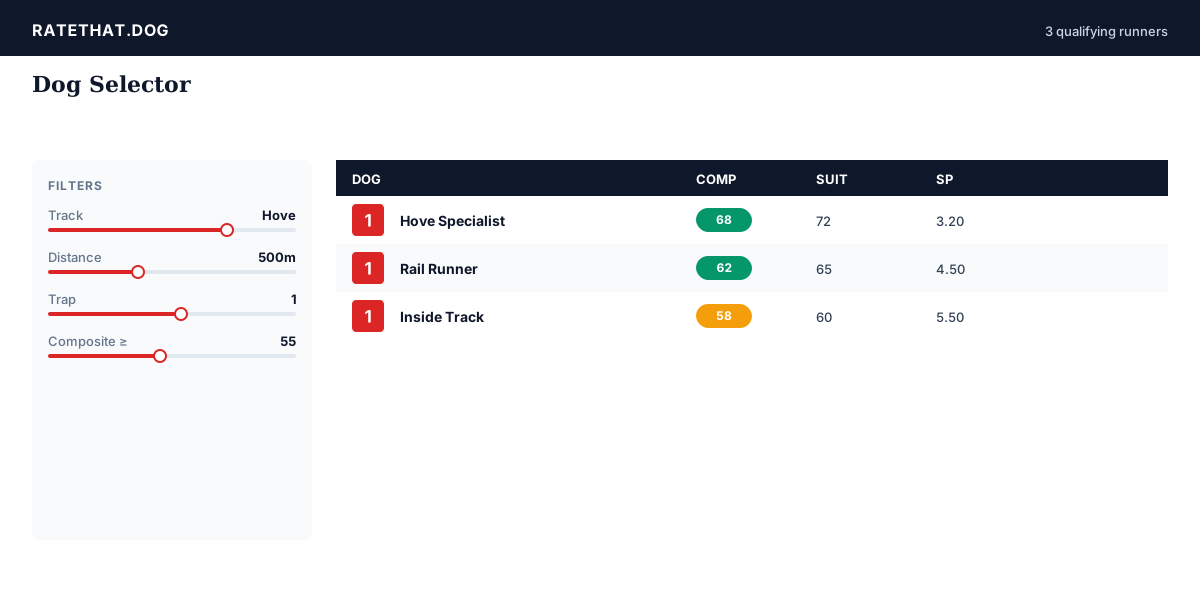
The Dog Selector is a single, filterable table of every greyhound running on UK cards today. Each row is a runner; each column is a piece of data — trap, grade, recent form, composite score, speed rank, suitability, trainer in-form percentage, and dozens more. The point of the page is to let you find dogs that match a specific shape — fast.
Filters live in the sidebar. Slide one and the table updates instantly. There are over 30 filter dimensions covering live runner data and ML prediction features.
What's the simplest way to use it?
Pick one strong filter, see what shows up. "Composite score ≥ 60" alone will give you a useful list — every meaningfully-rated dog on today's card. "Composite rank in race = 1 AND gap to next ≥ 8" tightens it to standout top picks only. Pair the result with the Probabilities page to see how the model's confidence stacks against the market.
If you want a venue cut, add a track filter. If you want a class cut, add a grade filter. Two or three filters is usually plenty.
Which filters matter most?
- **Composite score** — the headline rating, explained in detail here. The single most useful filter on the page.
- **Composite rank in race** — finds top picks rather than absolute scores. Set to 1 to surface every race's #1 dog.
- **Speed rank in race** — useful for standard-distance racing where field speed dominates the composite.
- **Trap and track** — combine for trap-bias edges (e.g. Trap 1 at Hove, Trap 6 at Harlow).
- **Trainer win % (recent)** — useful when you want to ride a hot trainer's form.
- **Race confidence** — filter out low-confidence races to lift ROI.
How do I save what I've built?
Once your filters look right, save the result as a system. Give it a clear name. The platform now records every day's qualifying picks automatically and settles them when results land — no spreadsheet required.
All saved systems live on the Systems page with strike rate, place rate, ROI, and a daily breakdown. Give any new system at least 50 picks before you judge it.
What's the most common Dog Selector mistake?
Over-filtering. Stack six or seven conditions and you'll wait three weeks for ten qualifying picks — and even then the sample's too small to mean anything. Two to four filters expressing a single clear hypothesis usually beats a wall of stacked rules.
The second most common mistake is filtering on noise. "Dogs running in the second half of the card" is filtering on noise. "Dogs in Trap 1 at Hove with composite ≥ 55" is filtering on signal. If your filter would still make sense to a tipster who'd never seen the data, it's probably signal.
Frequently asked questions
How many filters does the Dog Selector support?
Over 30. They span live runner data (trap, grade, form, trainer) and ML prediction features (composite score, speed rank, suitability scores).
Can I save filter combinations?
Yes — save any filter combination as a betting system. The platform records every day's qualifying picks and tracks P&L automatically.
Does the Dog Selector update in real time?
Yes. The runner data refreshes through the day as racecards load and predictions snapshot. You'll always see today's full UK card.
What's the best beginner filter on the Dog Selector?
Composite score ≥ 60. It surfaces every dog the model rates strongly, in one click. Add a track filter to narrow the venue.
Where do I find the Dog Selector on ratethat.dog?
It's on the main nav as **Selector**, or directly at ratethat.dog/dog-selector.